How BrutePrint compromises biometric security
How BrutePrint compromises biometric security by exploiting vulnerabilities in the fingerprint recognition systems built into Android smartphones

Fingerprint recognition is considered a secure authentication method. Yet a range of techniques aim to defeat it, and a clear example is how BrutePrint compromises biometric security. These attacks usually reproduce the enrolled finger physically, using silicone pads or conductive ink prints. Ingenious as they are, such approaches run into practical challenges.
Is there a more sophisticated approach, entirely digital and free from the limitations of physical imitation? Chinese researchers Yu Chen and Yiling He have found one. In a recent study, they detail how it is possible to force access to virtually any Android phone protected by a fingerprint, through an attack called BrutePrint.
Just how unique are fingerprints?
Before we look at our Chinese colleagues' study, let's review some theory. As you may already know, fingerprints are unique and remain unchanged over time.
In 1892, the English scientist Sir Francis Galton published a work titled Finger Prints, in which he compiled the information available at the time and laid the groundwork for its use in forensic medicine. Among his findings, he calculated that the probability of two fingerprints matching was one in sixty-four billion, a figure forensic experts have stood by ever since.
Are fingerprint sensors really reliable?
The work of Sir Francis Galton and his legacy belong to the analog world, where identification through fingerprints has been central to fields such as criminology. The digital environment, however, operates on a different logic. The quality of biometric authentication depends on a number of factors, including the type of sensor, its size and resolution, and the matching and image processing algorithms.
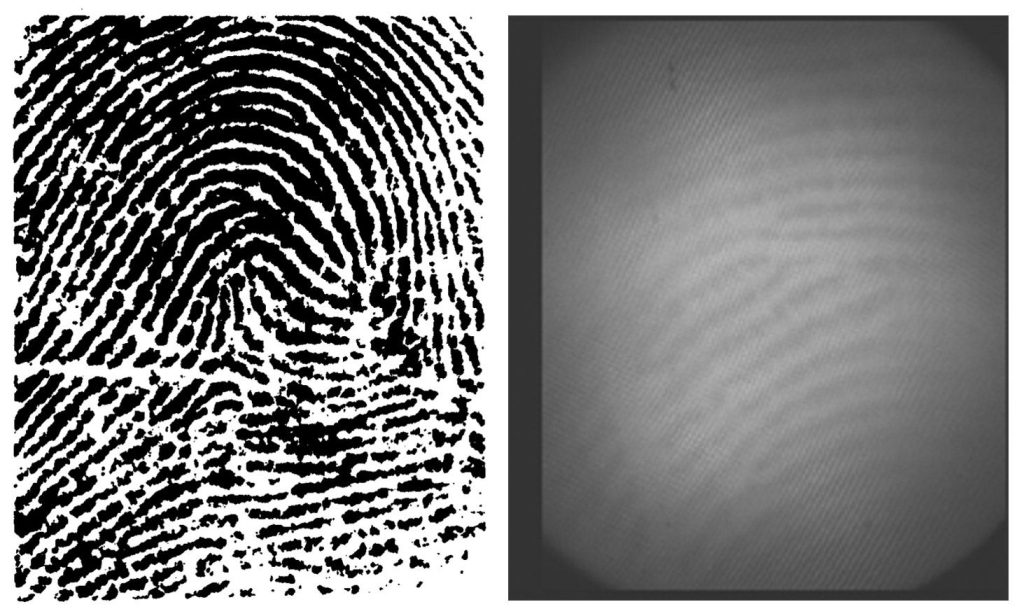
Fingerprints captured 150 years ago by Sir Francis Galton (left) compared with the optical sensor technology in the most advanced smartphones (right). Source and Source.
Developers face a balancing act: keeping costs down so devices remain affordable, ensuring authentication is fast enough to avoid complaints about sluggishness, and minimizing false negatives so users don't get frustrated. As a result, fingerprint recognition systems are not always accurate.
When it comes to the sensors used in smartphones, the figures for the probability of partial fingerprint matches are far less reassuring than the famous 1 in 64 billion. Apple, for example, estimates the accuracy of Touch ID at 1 in 50,000. For cheaper sensors, that probability drops even further.
That brings the security margin down from billions to mere thousands, which puts the system at risk from brute-force attacks. In that scenario, the last obstacle an attacker faces is the limit on fingerprint authentication attempts: by default, only five attempts are allowed before the system imposes an extended lockout.
Can that lockout be overcome? According to the study by Yu Chen and Yiling He, the answer is yes
BrutePrint and brute force on Android phones protected by fingerprint
The method takes advantage of a flaw in how the fingerprint sensor is implemented on Android, where communication is not encrypted. That enables a MITM attack, intercepting and manipulating data with a pseudo-sensor connected to the device's SPI port.
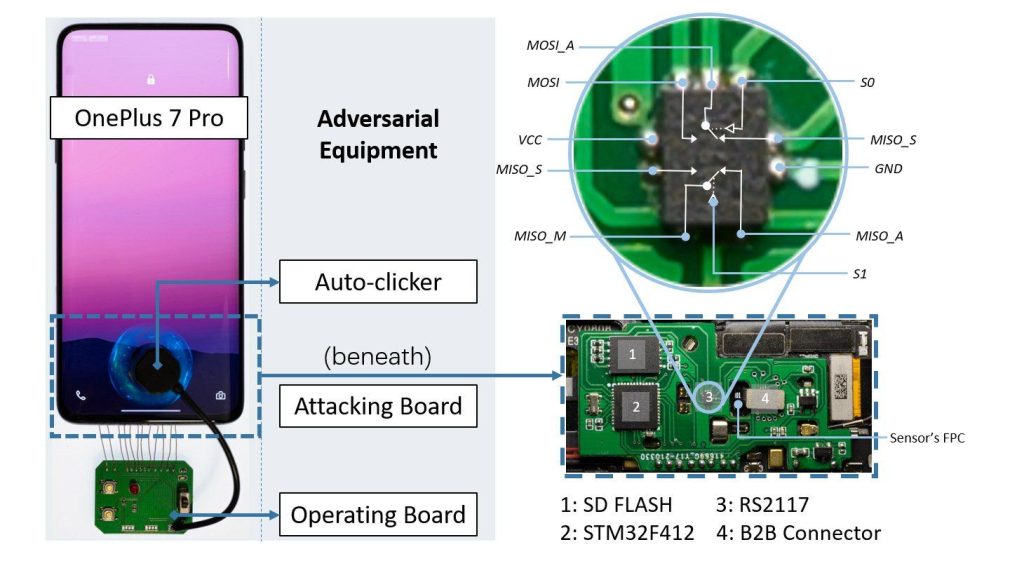
Equipment built to run a brute-force attack against fingerprint authentication systems. Source.
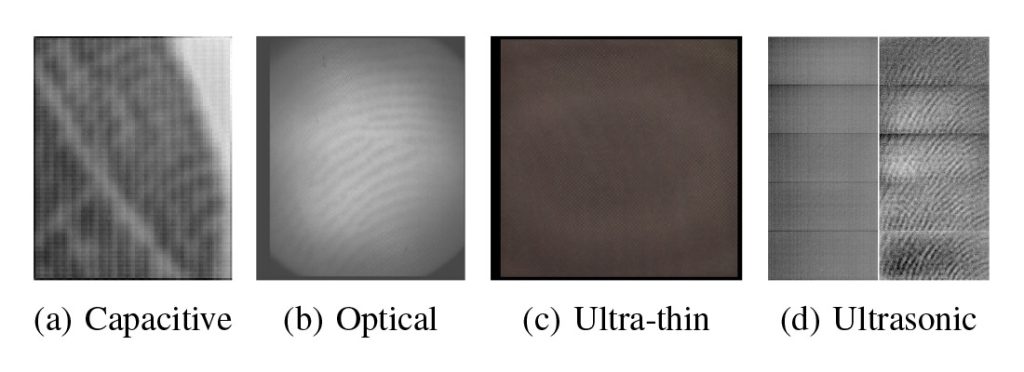
The images produced by different fingerprint sensors vary significantly from one another. Source.
The researchers automated the mass submission of fingerprint images for the brute-force attack and used artificial intelligence to generate a fingerprint dictionary, improving the attack's accuracy. Although they did not disclose the source of their database, they suggest it could come from earlier research or from leaks.
BrutePrint exploits two vulnerabilities: Cancel-After-Match-Fail and Match-After-Lock
The BrutePrint attack relies on two vulnerabilities in the fingerprint authentication system on Android phones. These flaws, present across the board, have been identified as Cancel-After-Match-Fail (CAMF) and Match-After-Lock (MAL).
Cancel-After-Match-Fail (CAMF)
This vulnerability exploits the multi-sampling used by the authentication system, where each attempt uses two to four fingerprint images depending on the device model. On top of that, if an authentication attempt produces an error rather than a definitive failure, the system restarts the process instead of locking it.
That allows an attacker to send a series of images ending in a pre-edited frame designed to trigger an error. If any image matches the enrolled one, authentication succeeds. If not, the cycle simply restarts without consuming additional attempts.
Match-After-Lock (MAL)
The second vulnerability exploits flaws in the authentication lockout that follows failed attempts. Although Android should prevent further attempts after a set number of failures, many manufacturers do not implement this feature correctly.
While successful authentication cannot occur during the lockout, the system still responds with “true” or “false” values to images sent repeatedly.
That makes it possible to identify the correct image and use it as soon as the system comes out of lockout, achieving authentication.
BrutePrint exploits two vulnerabilities: Cancel-After-Match-Fail and Match-After-Lock
The attack targeting Cancel-After-Match-Fail managed to break every smartphone running genuine Android but, interestingly, had no effect on HarmonyOS.
The Match-After-Lock vulnerability, on the other hand, was successfully exploited on vivo and Xiaomi devices, as well as on both Huawei models running HarmonyOS.
What about iPhones?
The Touch ID system found in iPhones has proven more resistant to BrutePrint. According to the study, its main strength lies in the encryption of communication between the fingerprint sensor and the rest of the system, which prevents interception or manipulation of biometric data on Touch ID devices.
While the report does reveal that iPhones may be partially vulnerable to certain methods for increasing the number of recognition attempts, the situation is not alarming. Unlike Android devices, which allow unlimited authentication attempts, on iPhones that number can only be raised from 5 to 15.
As a result, iOS users can feel more secure: Touch ID offers stronger protection than the biometric authentication systems used on Android and HarmonyOS. What's more, most iPhone models have now adopted Face ID as their primary security method.
What are the actual risks?
Android phone users have no reason to be alarmed by BrutePrint, because in practice the attack does not represent a significant threat. That comes down to several factors:
- It requires physical access to the device, which drastically reduces the likelihood of facing an attempt.
- The device has to be taken apart and a specific piece of hardware connected to the motherboard, which is hard to do without the owner knowing.
- The process is slow; even under ideal conditions, it can take several hours.
- It demands a specialized setup, including custom hardware, a fingerprint database and a trained artificial intelligence.
All of these elements combined make a real-world BrutePrint attack unlikely to be viable, unless someone with a commercial mindset builds an affordable tool based on this study.
How to protect your Android phone from fingerprint brute-force attacks
If you are concerned about this type of attack, there are precautions you can take to strengthen your device's security:
- Enroll as few fingerprints as possible, ideally just one. The more fingers you store, the more exposed the system is to attacks like BrutePrint.
- Pair biometric authentication with a PIN or a password, especially in apps that offer the option. That adds an extra layer of protection.
- The AppLock feature, available in the paid version of Kaspersky for Android, lets users set individual passwords for their apps, adding an extra layer of security. With this tool, even if someone manages to unlock the device, they cannot get into protected apps without the corresponding password.