
At Microsoft, they have encouraged their communications team to be innovative in how they use artificial intelligence. They have been urged to explore and experiment with how they can bring this technology into their daily tasks. While they have been reminded of the importance of their unique skills and experience in the communications field, they have also been encouraged to embrace the science in order to lead this new era.
So, over the past few months, they have been testing Copilot for Microsoft 365, which is now available to businesses. They use Copilot in Teams to build stories with spokespeople and anticipate coverage after interviews. In Word, they use it to start blogs and draft plans. In chat, they test messages, share ideas and expand their thinking. And in PowerPoint, Copilot helps them build clear, effective presentations.
They have noticed the impact on their day-to-day work, but they wanted to measure it, so they ran their own research. Using the same methodology as their latest Work Trend Index, they surveyed 80 people on their communications and marketing team. They found that, like many knowledge workers, many employees suffer from too many meetings (70%) and information overload (86%) every day. It is no surprise that 80% struggle to find focus time each day.
The good news? AI is working its magic. According to the survey:
86% say Copilot makes them more productive and 81% say it helps them complete tasks faster. 89% say Copilot boosts their creativity and 78% say it improves the quality of their work. 70% say Copilot reduces the time spent on tasks they do not enjoy; specifically, 76% say it lowers the mental effort required for mundane tasks and 71% say it cuts the time spent searching for information. And the most exciting part: 84% do not want to go back to working without Copilot. And they feel the same way. 😊
It is still early and the tools are not perfect, but to help other communicators think about how AI can improve their workdays, here are five ways the team and they are using AI to be more productive, more creative and to make their work a little more fun.
\1. Meetings and interviews
The stress they feel does not come only from back-to-back meetings; double bookings and conflicts are common too (if your calendar looks anything like mine). Copilot in Teams makes it easier to prioritize the most important meetings and catch up on the ones they have missed — without having to watch the full recording. A few suggestions:
- Summarize what was discussed in the meeting in short bullet points.
- Were there any action items for them?
- Was any decision left unresolved?
During or after a meeting, Copilot can also help recall exactly what was discussed, capture a great quote or detail for a story, evaluate complex topics or anticipate coverage after an interview. For example, they can ask:
- What was the exact feedback that <X> shared about the communications plan that was presented?
- The engineer they spoke with shared an interesting anecdote about <X> that they would like to include in a story they are working on. Can they recall exactly what he said?
- Put the pros and cons of what the team is discussing about the announcement strategy in a table and recommend a course of action.
- After a press interview, ask: "What do you think the reporter will take away from this conversation? Use the transcript as the source document."
\2. Message testing
Clarity is essential in communications, but it may be even more critical in the military. Napoleon, the famous general, used to bring a corporal into meetings when his generals presented war plans. He would ask the corporal: "After hearing these plans, would you know what to do?" If the answer was no, he asked the generals to rewrite their plans.
What does this have to do with AI? 🤔
They have been using Copilot as their corporal to get a fresh perspective. Some examples:
- They give Copilot a blog and ask it to articulate the three key messages; if they are wrong, they refine them.
- They ask Copilot to critique a statement on a complicated topic, such as sustainability or responsible AI. They ask things like: "If you wanted to disrupt this discussion, what would you say?"
- With Copilot as a brainstorming partner, they can identify blind spots, sharpen their positions and expand their thinking so they are clear and thoughtful in where they stand.
\3. Spokesperson preparation
To help their spokespeople prepare for press interviews, they are using Copilot to anticipate questions and develop FAQs. Some example prompts:
- Imagine you are a technology reporter. What would be the top five questions you would have if you were presented with the information in this narrative document: /[X]?
- Imagine you are a PR person preparing an executive for an interview with a major technology reporter, <reporter from X> at <outlet X>. He has been writing quite a bit about AI. What questions do you think the reporter will ask a technology executive about how AI will change work?
- I am doing a press interview about <X>. What are the top three questions someone unfamiliar with the topic would have?
- Help me draft the answers to this list of questions <X>. The answers should be brief, but conversational in tone.
\4. Writing communications plans and blogs
Many communicators are hired for their unique writing ability. And while that skill remains essential, they have found that Copilot is a great help for getting started, making progress and refining their content. It is helping them do what they do best, even better.
Some examples:
- In Word, they highlight a paragraph of a plan or blog where they are stuck and ask Copilot to suggest other ways to write it.
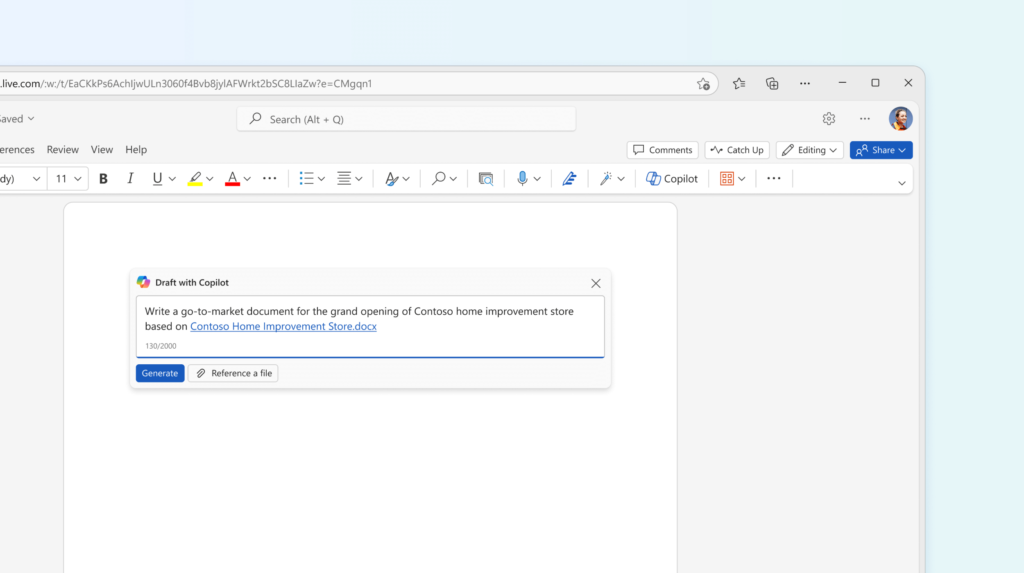
- Other team members use Copilot to draft a plan for an upcoming announcement. They give it a list of the elements they want to include, such as what they are announcing, the key messages, the timelines, the press targets and the spokespeople. While it does not produce a complete end-to-end plan, it gives them a good starting point.
- When they are at the end of a blog and do not know how to close it, they like to ask Copilot to write a short but compelling final paragraph. And because they use Copilot for Microsoft 365, confidential information, such as plans and launch dates, stays protected.
- Finally, when the blog or LinkedIn post is finished and they have exhausted all their creativity but still need a title or headline, they can ask Copilot for five headlines and then pick the best one.
\5. Creating presentations
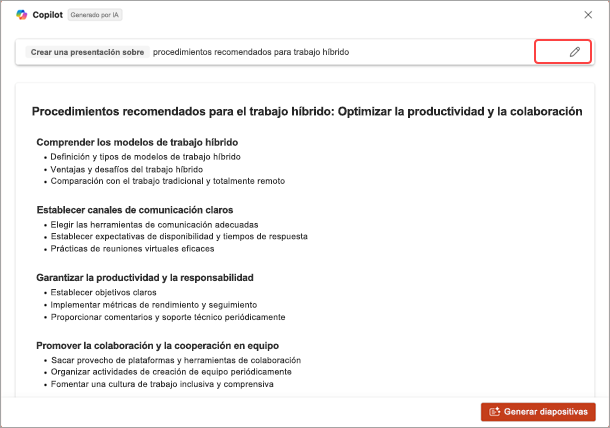
Sometimes, the way they present their ideas is as important as the content itself. So it is no surprise that one of their team's favorite uses of Copilot is turning a Word document, such as a PR plan, into a PowerPoint presentation.
They simply open a new presentation in PowerPoint, select the Copilot icon in the ribbon and, once the side pane appears, click "Create presentation from file...". They select the document and let Copilot handle building the deck.
From there, they can ask Copilot to add a closing slide, to give every title a specific font and color, or to update one of the images to a photo they like better. This has dramatically reduced the time it takes their team to create presentations, letting them focus more on the content and less on copying and pasting.
Integrating Copilot into Microsoft 365 has proven to be a transformative tool for Microsoft's communications team. By adopting artificial intelligence, they have managed not only to increase their productivity and creativity, but also to improve the quality of their work and reduce the time spent on tedious tasks. The internal research reflects a significant positive impact, with most of the team reporting clear benefits in their day-to-day work. While there is still room for improvement, the enthusiasm for continuing to use Copilot is clear, pointing to a promising path toward a more efficient and more satisfying future of work.
Until next time.