
Migrating applications and data from on-premises environments to the cloud is no longer optional: it is a critical strategy for competitiveness and innovation. However, this process can seem complex if it is not approached with planning and knowledge. In this guide, you will learn how to carry out a cloud migration, why Microsoft Azure is the ideal platform and what the four pillars for migrating with confidence are.
Why migrate to the cloud now?
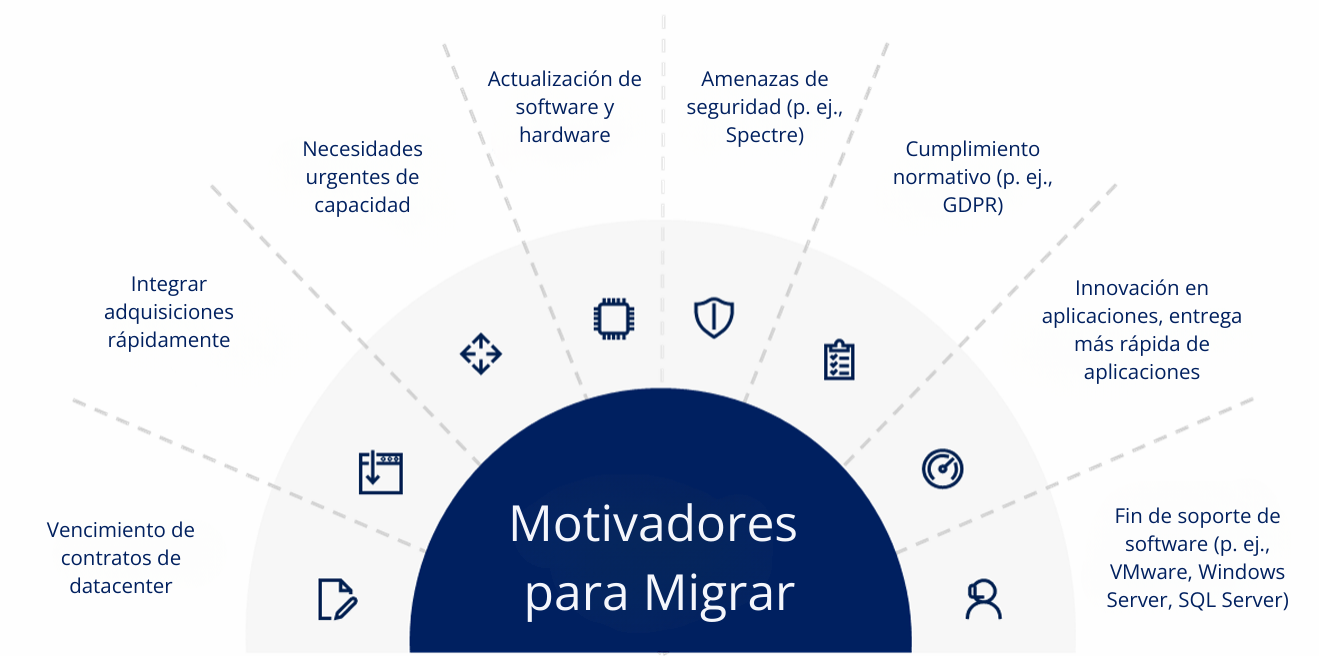
The cloud is not just a technology trend, it is the core of digital transformation. According to a Forrester Consulting study, companies that migrate to Azure reduce IT administration time by 80% and accelerate application delivery by 50% (TEI Study: Forrester)
In addition, Gartner warns that more than 80% of CIOs are under pressure to evaluate migrating their data centers to the cloud. Why? Because the cloud offers:
- Lower operating costs.
- Global scalability.
- Greater security and regulatory compliance.
Strategic benefits of the cloud
Migrating applications to the cloud does not only optimize costs, it also unlocks new opportunities:
Global scalability: deploy applications in minutes, not months.
Advanced security: with Azure Security Center and more than 90 certifications.
Business continuity: thanks to Azure Site Recovery.
Accelerated innovation: integrate AI, IoT and data analytics to build intelligent solutions.
4 Tips to Migrate to the Azure Cloud Successfully
Tip 1: Understand the value of migration
Migrating is not simply moving data; it is transforming your operating model. With Azure, migration allows organizations to go beyond the simple transfer of information, driving significant changes in the way they manage and develop their operations.
Cost reduction: By moving workloads to Azure, spending on physical infrastructure and the associated maintenance goes down. This frees up financial resources that can be directed to strategic or innovation initiatives.
Task automation: The cloud makes it possible to eliminate repetitive processes, such as applying patches and manual configurations. Teams can then focus on higher-value activities and speed up project delivery.
Faster time to market: Migrating to Azure makes it easier to accelerate the launch of products and services, which has a direct impact on the organization's revenue and competitiveness.
Practical example: A company that used to need six months to provision physical servers can now complete that process in a matter of minutes using Azure virtual machines.
Tip 2: Choose the right platform
Selecting the cloud platform is a strategic step in ensuring a successful migration. Azure stands out for its four fundamental pillars, which offer key advantages for organizations.
Productivity: Azure provides a set of integrated developer tools covering everything from DevOps to serverless architectures. This makes process automation, team collaboration and continuous application delivery easier, resulting in more agile and efficient development cycles.
Trust: The platform offers high standards of security, privacy and regulatory compliance, which support more than 90% of Fortune 500 companies (Source: https://learn.microsoft.com/en-us/compliance/). This means you can operate knowing that your data and operations meet the most demanding regulatory requirements.
Intelligence: Azure integrates advanced artificial intelligence and data analytics services, making it possible to build intelligent applications that generate value through automation, machine learning and predictive analytics.
Hybrid: It offers the flexibility to combine cloud and on-premises services through Azure Stack. This allows you to adopt hybrid models that fit the specific needs and regulations of each business.
These pillars make Azure a solid, reliable platform that is ready to support the growth and innovation of organizations during and after the migration process.
Tip 3: Understand cloud uses and benefits
Migrating applications to the cloud represents a strategic opportunity for organizations, making it possible to take advantage of a series of key benefits that have a positive impact on both operations and business innovation.
Analyze data and predict trends: The cloud makes it easier to access advanced analytics and artificial intelligence services, allowing you to extract value from large volumes of data, anticipate market behavior and make better-informed decisions.
Build global applications: With cloud infrastructure, you can develop and deploy applications at international scale in record time, reaching new markets and users without the traditional limitations of local resources.
Protect your business: Integrated security solutions, such as Microsoft Defender for Cloud, strengthen the protection of critical data and systems, mitigating risk and ensuring operational continuity in the face of emerging threats.
Reduce time and cost: Adopting cloud services lets you optimize infrastructure, cutting management time and the costs associated with maintaining and updating technology resources.
Example of the impact on companies
A real case demonstrates the tangible benefits of cloud migration. Companies that have adopted Azure PaaS have managed to cut the time spent on application management by up to 80% and deployment time by 50%, which translates into greater agility and efficiency in their operations.
Tip 4: Migrate with confidence and less risk
Migrating to the cloud can be a complex process, but Azure provides tools and strategies designed to reduce risk and guarantee a secure, efficient transition.
Key tools for a secure migration
Azure Migrate: Lets you assess your current environment and plan the migration process, making sure every step is backed by prior analysis and a strategy tailored to your company's specific needs.
Total Cost of Ownership (TCO) Calculator: Gives you the ability to calculate the savings you can obtain from migration, including up to 78% lower TCO for datacenter migration, 68% for rehost and 63% for rebuild. This makes it easier to make informed decisions based on the real economic impact of each option.
BETABOX: We provide expert support throughout the migration process, helping to answer questions and overcome technical challenges, which brings peace of mind and confidence to every stage of the project.
In addition, Azure makes it possible to save up to 82% on costs by taking advantage of reserved instances, which represents a significant advantage in optimizing the budget allocated to technology infrastructure.
Migration options
When you migrate your on-premises environment to the cloud, there are several alternatives that fit the needs and objectives of each company. The main migration options available are described below:
Rehost (Lift and Shift): This option consists of moving applications as they are, without making significant changes to their architecture or operation. It is ideal for those seeking a fast, simple transition to the cloud, prioritizing speed and reduced technical complexity.
Refactor: In this alternative, applications are optimized to make better use of cloud resources and capabilities. The goal is to improve performance, efficiency and integration with cloud services, making minimal but strategic adjustments to code or configuration.
Rebuild: This strategy involves rebuilding applications using native Azure services, which lets you take full advantage of what the platform offers. It is the recommended option for projects that require deep modernization and greater technological flexibility.
Analyzing these options is essential to choosing the migration approach that best fits your organization's objectives, ensuring a successful transition aligned with business needs.
Conclusion
Migrating your on-premises environment to the cloud is a strategic step for any company that wants to improve its agility, security and operational intelligence. Azure offers flexible alternatives for carrying out this process, whether by moving applications as they are, optimizing them for the cloud or rebuilding them with native services, depending on the particular needs of each organization.
Proper planning and the use of specialized tools are essential to achieving an effective migration. By analyzing the available options and choosing the approach most aligned with business objectives, your company can make the leap toward a more agile, secure and intelligent future, taking advantage of everything the Azure cloud has to offer.
Take the first step toward the enterprise cloud
Start the initial assessment to plan a secure, reliable cloud migration for your workloads.